Social Media Image Kit
Resize one image for Instagram, Pinterest, Facebook, LinkedIn, YouTube and more. Generate 27 ready-to-post sizes with Smart Crop and one-click ZIP export.
JPG, PNG, WebP, HEIC & more · Max 30MB · No watermark
4,820 people generated their social media kit today
Drag & drop image here
or click to upload
JPG, PNG, WEBP, GIF, AVIF, HEIF/HEIC (Max 30MB)
How to Use the Social Media Content Kit
Upload Your Image
Drag & drop or click to upload any image — JPG, PNG, WebP, GIF, AVIF, HEIC and more. Max 30MB.
Select Platforms
Toggle the platforms you need — Instagram, Facebook, X, YouTube & more.
Download ZIP
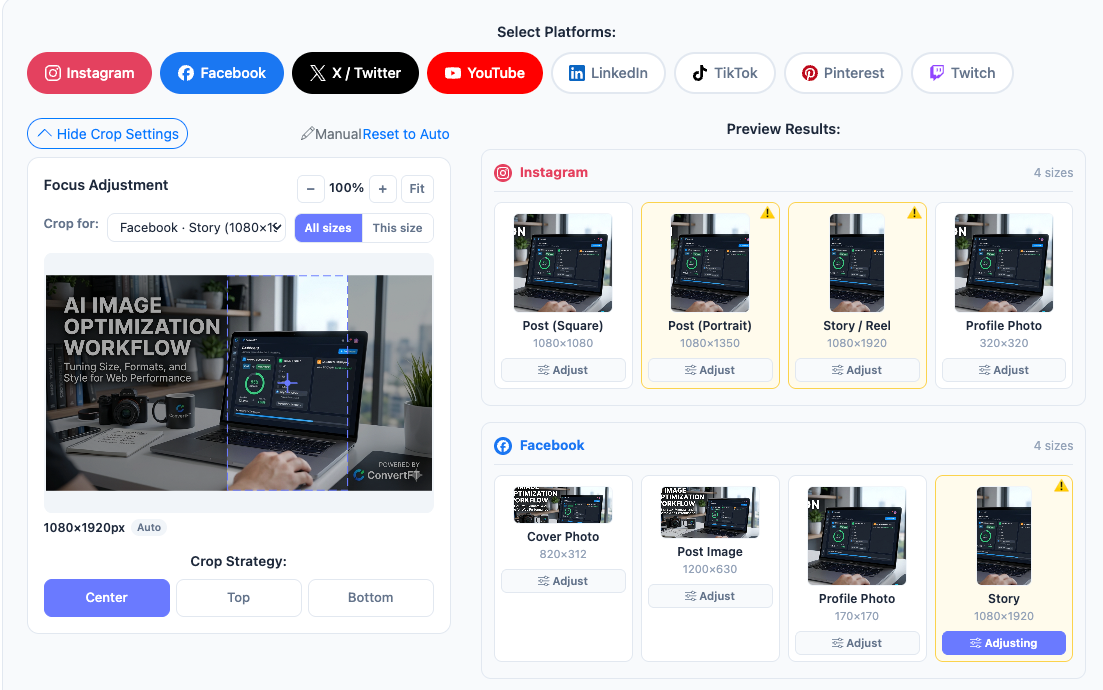
Adjust focus & quality, then download all sizes in one organized ZIP file.
Batch Social Media Kit — Why Resize One by One?
A batch social media kit is the difference between resizing every image by hand and exporting all 27 sizes at once.
Doing it manually
- Open a separate editor for each platform size
- Re-crop every photo to match each ratio by eye
- Rename files by hand so they're recognizable
- Compress and check each export individually
- ~15–30 min per photo, repeated daily
With the Batch Kit
- One upload generates all 27 sizes automatically
- Smart Crop keeps the subject in frame on every ratio
- Files named by size —
ig-square_1080x1080.jpg - Compression and format applied across the batch
- Done in seconds, consistent every time
Who Uses the Social Media Content Kit?
Content Creators
Publish one photo across Instagram, Facebook & YouTube without manually resizing each time.
Small Business Owners
Keep every social profile looking professional — from cover photos to product posts.
Social Media Managers
Batch-produce platform-ready images in seconds instead of opening five editing tools.
Ecommerce Sellers
Turn product photos into marketplace-ready listings — square, portrait and banner sizes for every channel in one batch.
Bloggers & Marketers
One featured image, every social share card — generate Open Graph, Pinterest and newsletter sizes from a single upload.
Agencies & Studios
Deliver client-ready social kits fast — consistent sizing, brand-consistent crops and organized ZIPs for every account you manage.
All Social Media Image Sizes — Instagram, Facebook, X, YouTube & More (2026)
Complete guide to social media image sizes in one place: Instagram post size (1080×1080), Instagram story size (1080×1920), Facebook cover photo size (820×312), X / Twitter header size (1500×500), YouTube thumbnail size (1280×720) and every other platform dimension below. Generate all of them at once with the free kit above.
| Platform | Size Name | Dimensions | Format |
|---|---|---|---|
| Post (Square) | 1080 × 1080 | JPG | |
| Post (Portrait) | 1080 × 1350 | JPG | |
| Story / Reel | 1080 × 1920 | JPG | |
| Profile Photo | 320 × 320 | JPG | |
| Cover Photo | 820 × 312 | JPG | |
| Post Image | 1200 × 630 | JPG | |
| Profile Photo | 170 × 170 | JPG | |
| Story | 1080 × 1920 | JPG | |
| Event Cover | 1200 × 628 | JPG | |
| X / Twitter | Header Image | 1500 × 500 | JPG |
| X / Twitter | Post Image | 1600 × 900 | JPG |
| X / Twitter | Profile Photo | 400 × 400 | JPG |
| X / Twitter | Link Card | 1200 × 628 | JPG |
| YouTube | Thumbnail | 1280 × 720 | JPG |
| YouTube | Channel Art | 2560 × 1440 | JPG |
| YouTube | Profile Photo | 800 × 800 | JPG |
| Personal Banner | 1584 × 396 | JPG | |
| Post Image | 1200 × 627 | JPG | |
| Profile Photo | 400 × 400 | JPG | |
| TikTok | Video Cover | 1080 × 1920 | JPG |
| TikTok | Profile Photo | 200 × 200 | JPG |
| Standard Pin | 1000 × 1500 | JPG | |
| Square Pin | 1000 × 1000 | JPG | |
| Tall Pin | 1000 × 2100 | JPG | |
| Profile Photo | 165 × 165 | JPG | |
| Twitch | Profile Banner | 1200 × 480 | JPG |
| Twitch | Profile Photo | 256 × 256 | PNG |
Per-Platform Size Guides
What Users Say
Saves me 30 minutes every week. One upload and I have all my Instagram, Facebook and YouTube images ready to publish.
As a freelance marketer, the ZIP export with folder-per-platform is exactly what I needed for client deliverables.
The focus adjuster is genius — I can drag exactly where my subject is and every size keeps it in frame.
Social Media Content Kit FAQ
Quick answers on the kit and each platform's image sizes — or jump to the full size table above.
Related Image Tools
Social Media Image Tips
Practical guides on sizing, cropping and optimizing images for every social platform.